
Vuze Features
A complete breakdown of the most advanced, configurable BitTorrent client ever built. Every tool you need for professional P2P management.
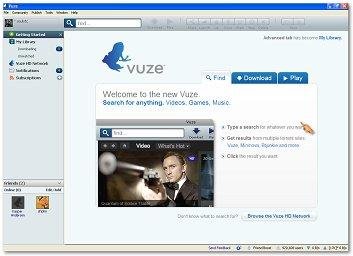
Vuze Application Interface - Welcome screen with integrated search, video preview, and download management
Torrent & Magnet Downloader
Download torrent files and magnet links with full protocol support. Vuze handles DHT, PEX, LPD, and UDP tracker protocols natively. Automatic metadata retrieval for magnet links ensures fast starts.
- Native .torrent and magnet link support
- Sequential download option for media playback
- Automatic tracker scraping and updates
- Super-seeding mode for initial distribution
Advanced P2P Encryption
Protect your privacy with built-in protocol encryption, peer obfuscation, and support for TLS/SSL connections. Vuze pioneered encryption innovations in the BitTorrent ecosystem.
- Protocol encryption (PE/MSE)
- TLS/SSL tracker and peer connections
- IP filtering and blocklist support
- I2P and Tor helper plugin support
HD Media Player & Converter
Play HD video directly within Vuze while downloading. Convert and transcode media for PSP, TiVo, Xbox, PS3, iTunes (iPhone, iPod, Apple TV), and more without third-party tools.
- Integrated HD video player
- Device-specific transcoding profiles
- Subtitle support
- Drag-and-drop media conversion queue
Remote Torrent Management
Manage your downloads from anywhere with Vuze Remote. Available for Android and through any modern web browser. Start, pause, and monitor torrents on your home machine while on the go.
- Vuze Remote for Android
- Web-based remote interface
- Real-time download statistics
- Add torrents remotely via URL or magnet
Performance & Bandwidth Control
Fine-tune every aspect of network utilization. Set global and per-torrent speed limits, connection limits, and seeding priorities. Vuze's intelligent algorithms maximize throughput without overwhelming your connection.
- Global and per-torrent speed limits
- Scheduled speed profiles
- Seeding priority and ratio management
- Connection health diagnostics
Extensive Plugin Ecosystem
Extend Vuze with hundreds of community plugins. Add RSS auto-downloading, detailed statistics, social features, swarm merging, and third-party integrations. The plugin architecture makes Vuze infinitely adaptable.
- RSS Feed Scanner for automated downloads
- Swarm Merge for faster completion
- Friends and chat plugins
- Custom statistics and visualization
Meta-Search & Content Discovery
Search multiple torrent sites simultaneously from within Vuze. The built-in meta-search aggregates results from popular indexes, saving time and helping you find the content you need legally and efficiently.
- Multi-site simultaneous search
- Search template customization
- Subscription and alert system
- Vuze HD Network for legal content
Cross-Platform Native Interface
Vuze runs on Windows, macOS, Linux, and BSD with a native look and feel on each platform. Built with Java SWT, it delivers consistent performance and a familiar interface regardless of your operating system.
- Windows (Win32/SWT)
- macOS (Carbon/Cocoa)
- Linux/BSD (GTK+/X11)
- 35+ language localizations
Technical Innovations
Vuze has contributed significant advancements to the BitTorrent movement. These technologies are built into every client.
DHT Enhancements
Improved distributed hash table implementations for faster peer discovery without trackers.
Vivaldi Network Coordinates
Intelligent peer selection based on network topology for optimized connection speeds.
FriendBoost
Prioritize bandwidth for trusted peers and friends within your personal network.
Reverse Subscriptions
Automated content distribution and subscription management directly within the client.
P2P Technology Visualized
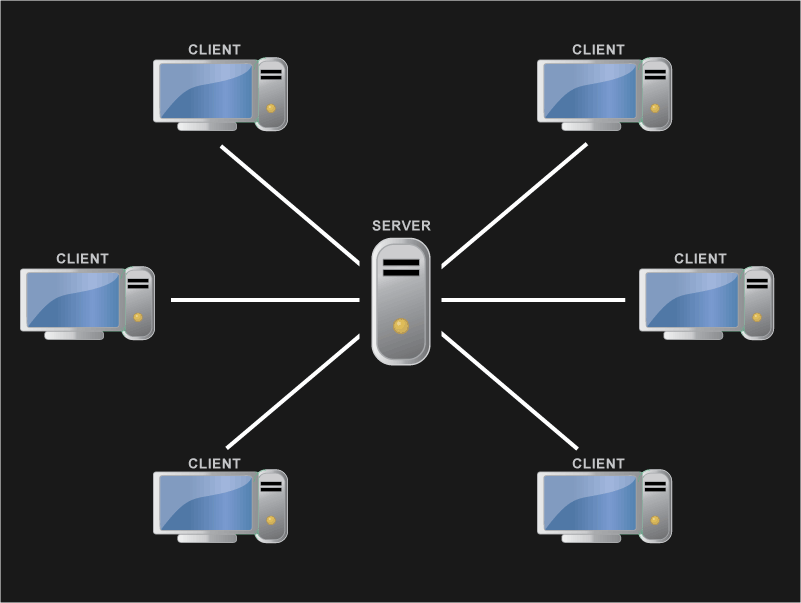
Old Client-Server Model - Centralized server delivering content to individual users with limited bandwidth and speed
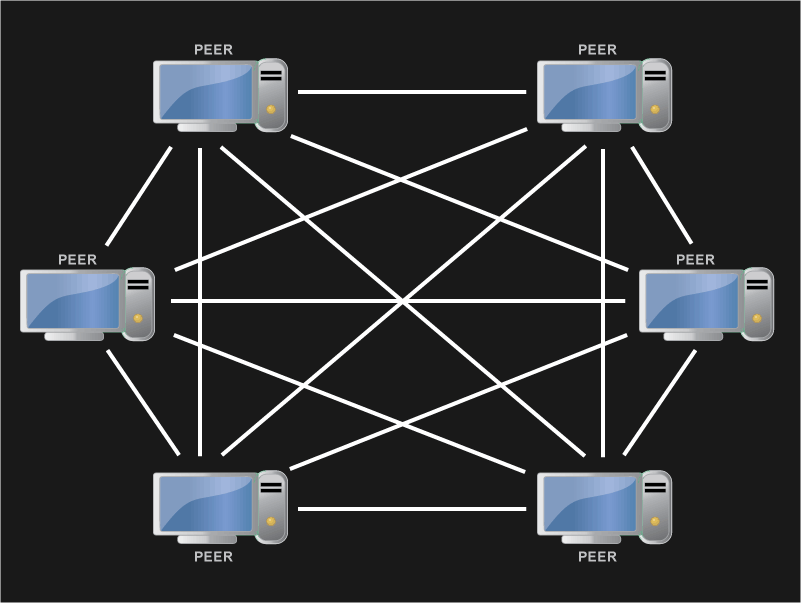
Modern Peer-to-Peer Distribution Model - Multiple peers simultaneously sharing file pieces across the swarm for faster downloads
Need Help Setting Up?
Our guides cover installation, configuration, troubleshooting, and advanced usage scenarios.
View Guides